Version

Changing Data Sources with the Web SDK

Your dashboard can use data from a variety of sources. In this part, you will learn how to change your data source to:

Changing your data source is an advanced configuration. If you need help with implementing Reveal SDK in your application, read Part One: The Basics.

Changing to a Local File

  1. Implement the IRVDataSourceProvider interface, in order to be able to change the data source. To do this, add a new LocalDataSourceProvider.cs class in your RevealSDK folder, as shown below:

    using Infragistics.Sdk;
    using System.Threading.Tasks;
    
    namespace Demo1.RevealSDK
    {
    	    public class LocalDataSourceProvider : IRVDataSourceProvider
    	    {
    	        public Task<RVDataSourceItem> ChangeDashboardFilterDataSourceItemAsync(string userId, string dashboardId, RVDashboardFilter filter, RVDataSourceItem dataSourceItem)
    	        {
    	            return Task.FromResult<RVDataSourceItem>(ChangeDataSourceItem(dataSourceItem));
    	        }
    
    	        public Task<RVDataSourceItem> ChangeVisualizationDataSourceItemAsync(string userId, string dashboardId, RVVisualization visualization, RVDataSourceItem dataSourceItem)
    	        {
    	            return Task.FromResult<RVDataSourceItem>(ChangeDataSourceItem(dataSourceItem));
    	        }
    
    	        private RVDataSourceItem ChangeDataSourceItem(RVDataSourceItem dataSourceItem)
    	        {
    	            var excelItem = dataSourceItem as RVExcelDataSourceItem;
    	            var wrItem = excelItem?.ResourceItem as RVWebResourceDataSourceItem;
    	            if (wrItem != null && wrItem.Url.EndsWith("Samples.xlsx"))
    	            {
    	                var localItem = new RVLocalFileDataSourceItem();
    	                localItem.Uri = "local:/Marketing.xlsx";
    	                excelItem.ResourceItem = localItem;
    	                return excelItem;
    	            }
    	            else
    	            {
    	                return null;
    	            }
    	        }
    	    }
    	}
  2. Update your RevealSdkContext.cs to refer this provider:

    public IRVDataSourceProvider DataSourceProvider => new LocalDataSourceProvider();
  3. Create a new App_Data folder in the existing wwwroot folder of the project. Move the new file, for example Marketing.xlsx, in this folder. You can download the Marketing.xlsx file from here.

  4. Set App_Data as the LocalFilesStoragePath in the RevealEmbedSettings in Startup.cs. Add a new private field and change the constructor to have an environment:

    	private string _webRootPath;
    
    	public Startup(IConfiguration configuration, IHostingEnvironment environment)
    	{
    	    Configuration = configuration;
    	    _webRootPath = environment.WebRootPath;
    	}
  5. And update the AddRevealServices method in the same file:

    	services.AddRevealServices(new RevealEmbedSettings
    	{
    	    LocalFileStoragePath = Path.Combine(_webRootPath, "App_Data"),
    	    CachePath = @"C:\Temp"
    	}, new RevealSdkContext());

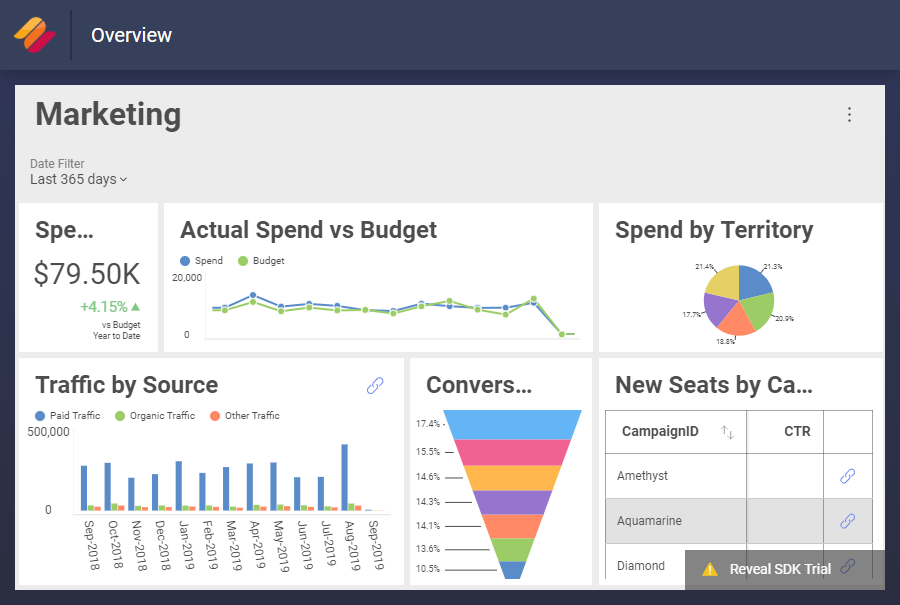
Now, if you run the application and load the Marketing.cshtml page, you will see the dashboard based on the updated data that we provided:

marketing dashboard using the new data source file

A sample git commit for replacing your data source with a file.

Changing to an In-Memory Data Source

To replace the data source with an in-memory one, perform the following steps:

  1. Create a new class - MarketingInfo.cs. It should have same properties as the columns in your Marketing.xlsx file (the data source file you used in Changing to a local file). Put it in the Models folder.

    	using Infragistics.Sdk;
    	using System;
    
    	namespace Demo1.Models
    	{
    	    public class MarketingInfo
    	    {
    	        [RVSchemaColumn("Date", RVSchemaColumnType.Date)]
    	        public DateTime? Date { get; set; }
    	        public double Spend { get; set; }
    	        public double Budget { get; set; }
    	        public double CTR { get; set; }
    	        [RVSchemaColumn("Avg. CPC")]
    	        public double AvgCPC { get; set; }
    	        public double Traffic { get; set; }
    	        [RVSchemaColumn("Paid Traffic")]
    	        public double PaidTraffic { get; set; }
    	        [RVSchemaColumn("Organic Traffic")]
    	        public double OrganicTraffic { get; set; }
    	        [RVSchemaColumn("Other Traffic")]
    	        public double OtherTraffic { get; set; }
    	        public double Conversions { get; set; }
    	        public string Territory { get; set; }
    	        public string CampaignID { get; set; }
    	        [RVSchemaColumn("New Seats")]
    	        public double NewSeats { get; set; }
    	        [RVSchemaColumn("Paid %")]
    	        public double PaidRatio { get; set; }
    	        [RVSchemaColumn("Organic %")]
    	        public double OrganicRatio { get; set; }
    
    	        public MarketingInfo(DateTime? date, double spend, double budget, double ctr, double avgCPC, double traffic, double paidTraffic, double organicTraffic, double otherTraffic, double conversions, string territory, string campaignID, double newSeats, double paidRatio, double organicRatio)
    	        {
    	            Date = date;
    	            Spend = spend;
    	            Budget = budget;
    	            CTR = ctr;
    	            AvgCPC = avgCPC;
    	            Traffic = traffic;
    	            PaidTraffic = paidTraffic;
    	            OrganicTraffic = organicTraffic;
    	            OtherTraffic = otherTraffic;
    	            Conversions = conversions;
    	            Territory = territory;
    	            CampaignID = campaignID;
    	            NewSeats = newSeats;
    	            PaidRatio = paidRatio;
    	            OrganicRatio = organicRatio;
    	        }
    	    }
    	}
  2. Create an in memory implementation of IRVDataSourceProvider. Add InMemoryDataSourceProvider.cs to your RevealSDK folder:

    	using Infragistics.Sdk;
    	using System.Threading.Tasks;
    
    	namespace Demo1.RevealSDK
    	{
    	    public class InMemoryDataSourceProvider : IRVDataSourceProvider
    	    {
    	        public Task<RVDataSourceItem> ChangeDashboardFilterDataSourceItemAsync(string userId, string dashboardId, RVDashboardFilter filter, RVDataSourceItem dataSourceItem)
    	        {
    	            return Task.FromResult<RVDataSourceItem>(ChangeDataSourceItem(dataSourceItem));
    	        }
    
    	        public Task<RVDataSourceItem> ChangeVisualizationDataSourceItemAsync(string userId, string dashboardId, RVVisualization visualization, RVDataSourceItem dataSourceItem)
    	        {
    	            return Task.FromResult<RVDataSourceItem>(ChangeDataSourceItem(dataSourceItem));
    	        }
    
    	        private RVDataSourceItem ChangeDataSourceItem(RVDataSourceItem dataSourceItem)
    	        {
    	            return new RVInMemoryDataSourceItem("Marketing");
    	        }
    	    }
    	}
  3. Add also the InMemoryDataProvider.cs, which will implement the IRVDataProvider and will include your in-memory dataset:

    	using Demo1.Models;
    	using Infragistics.Sdk;
    	using System;
    	using System.Collections.Generic;
    	using System.Threading.Tasks;
    
    	namespace Demo1.RevealSDK
    	{
    	    public class InMemoryDataProvider : IRVDataProvider
    	    {
    	        public Task<IRVInMemoryData> GetData(string userId, RVInMemoryDataSourceItem dataSourceItem)
    	        {
    	            var datasetId = dataSourceItem.DatasetId;
    	            if (datasetId == "Marketing")
    	            {
    	                var data = new List<MarketingInfo>()
    	                {
    	                    new MarketingInfo(new DateTime(2019,  1, 1), 714.60, 316.44, 0.12, 6.26, 3157.98, 6080.00, 1796.20, 1409.44, 180.71, "Americas", "Topaz", 125, 0.65, 0.19),
    	                    new MarketingInfo(new DateTime(2019,  1, 5), 574.22, 510.04, 0.59, 10.21, 1301.39, 7527.00, 1748.08, 1355.64, 240.76, "Japan", "Paradot", 421, 0.71, 0.16),
    	                    new MarketingInfo(new DateTime(2019,  1, 19), 683.64, 239.15, 0.28, 13.40, 1632.19, 11395.00, 1821.19, 1154.92, 318.74, "EMEA", "Sapphire", 510, 0.79, 0.13),
    	                    new MarketingInfo(new DateTime(2019,  1, 8), 193.14, 610.29, 0.19, 17.81, 891.16, 16134.00, 1293.81, 1059.82, 249.25, "India", "Paradot", 322, 0.87, 0.07),
    	                    new MarketingInfo(new DateTime(2019,  1, 14), 245.85, 265.81, 0.49, 3.74, 2534.60, 12107.00, 950.05, 1101.96, 453.98, "India", "Aquamarine", 175, 0.86, 0.07),
    	                    new MarketingInfo(new DateTime(2019,  1, 22), 541.01, 244.69, 0.23, 9.88, 2926.82, 18254.00, 901.55, 1089.60, 430.01, "EMEA", "Diamond", 220, 0.9, 0.04),
    	                    new MarketingInfo(new DateTime(2019,  2, 24), 742.28, 632.00, 0.48, 5.17, 802.40, 18337.00, 1260.84, 1122.47, 393.61, "Americas", "Aquamarine", 364, 0.88, 0.06),
    	                    new MarketingInfo(new DateTime(2019,  2, 28), 304.11, 581.95, 0.36, 9.13, 3738.46, 5490.00, 1964.76, 1081.17, 198.80, "Japan", "Paradot", 406, 0.64, 0.23),
    	                    new MarketingInfo(new DateTime(2019,  2, 14), 521.76, 644.17, 0.36, 7.60, 1577.75, 2205.00, 1562.82, 1274.22, 353.55, "Japan", "Paradot", 453, 0.44, 0.31),
    	                    new MarketingInfo(new DateTime(2019,  2, 2), 641.53, 185.98, 0.52, 7.47, 829.74, 2390.00, 1412.68, 963.95, 396.40, "EMEA", "Ruby", 387, 0.5, 0.3),
    	                    new MarketingInfo(new DateTime(2019,  2, 4), 317.28, 626.36, 0.43, 14.63, 2215.42, 7231.00, 1521.36, 1253.34, 440.28, "EMEA", "Paradot", 173, 0.72, 0.15),
    	                    new MarketingInfo(new DateTime(2019,  2, 20), 281.99, 664.01, 0.59, 15.12, 2317.75, 19228.00, 1831.72, 1082.90, 188.95, "Japan", "Aquamarine", 288, 0.87, 0.08),
    	                    new MarketingInfo(new DateTime(2019,  3, 24), 478.96, 229.02, 0.59, 2.03, 2651.86, 12628.00, 1897.20, 964.92, 460.75, "APAC", "Paradot", 158, 0.82, 0.12),
    	                    new MarketingInfo(new DateTime(2019,  3, 22), 432.48, 176.66, 0.58, 10.60, 2806.68, 12687.00, 1553.08, 1102.86, 206.73, "Japan", "Topaz", 380, 0.83, 0.1),
    	                    new MarketingInfo(new DateTime(2019,  3, 6), 467.20, 367.03, 0.47, 3.78, 2929.75, 4474.00, 1499.85, 1007.76, 246.24, "India", "Sapphire", 262, 0.64, 0.21),
    	                    new MarketingInfo(new DateTime(2019,  3, 4), 160.29, 409.02, 0.26, 12.48, 2851.68, 12177.00, 1395.06, 1327.04, 200.52, "India", "Ruby", 449, 0.82, 0.09),
    	                    new MarketingInfo(new DateTime(2019,  3, 27), 637.16, 239.13, 0.35, 13.31, 3550.41, 2680.00, 1721.95, 1023.73, 242.07, "APAC", "Ruby", 206, 0.49, 0.32),
    	                    new MarketingInfo(new DateTime(2019,  3, 2), 170.79, 265.84, 0.28, 10.97, 1157.39, 5577.00, 1173.30, 1405.94, 335.18, "Japan", "Paradot", 416, 0.68, 0.14)
    
    	                };
    
    	                return Task.FromResult<IRVInMemoryData>(new RVInMemoryData<MarketingInfo>(data));
    	            }
    	            else
    	            {
    	                throw new Exception("Invalid data requested");
    	            }
    	        }
    	    }
    	}

  4. What’s only left to do is to update your RevealSdkContext.cs file to use these providers:

    	public IRVDataSourceProvider DataSourceProvider => new InMemoryDataSourceProvider();
    
    	public IRVDataProvider DataProvider => new InMemoryDataProvider();

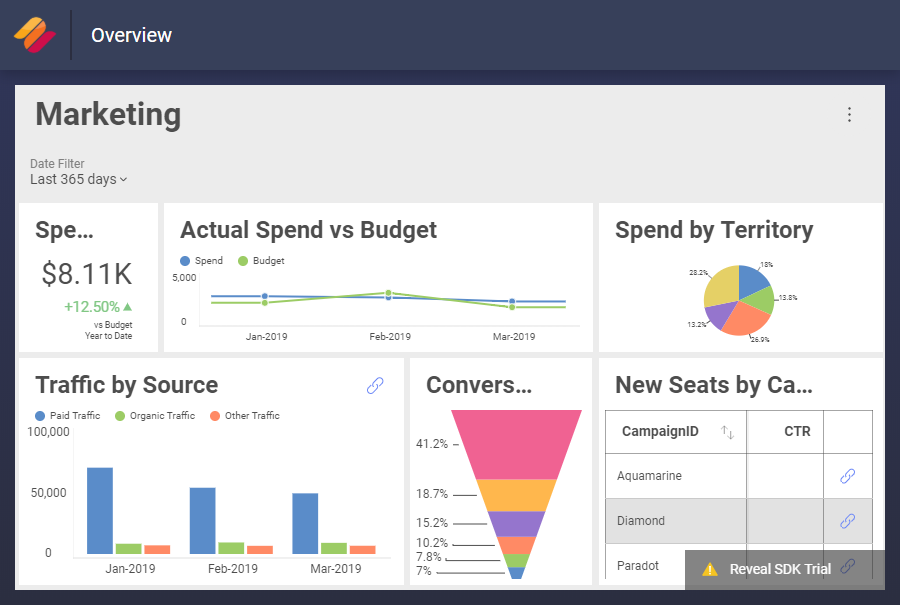
    Now, if you run the application and load the Marketing.cshtml page, you will see the dashboard based on the in-memory data that is provided in the GetData method of the InMemoryDataProvider:

marketing dashboard using in-memory data

A sample git commit for changing your data source file with an in-memory data source.

Changing to SQL Server

То change your data source to SQL Server, follow the steps below.

  1. Create a new class SqlServerDataSourceProvider.cs, which implements the IRVDataSourceProvider:

    	using Infragistics.Sdk;
    	using System.Threading.Tasks;
    
    	namespace Demo1.RevealSDK
    	{
    	    public class SqlServerDataSourceProvider : IRVDataSourceProvider
    	    {
    	        public Task<RVDataSourceItem> ChangeDashboardFilterDataSourceItemAsync(string userId, string dashboardId, RVDashboardFilter filter, RVDataSourceItem dataSourceItem)
    	        {
    	            return Task.FromResult<RVDataSourceItem>(ChangeDataSourceItem(dataSourceItem));
    	        }
    
    	        public Task<RVDataSourceItem> ChangeVisualizationDataSourceItemAsync(string userId, string dashboardId, RVVisualization visualization, RVDataSourceItem dataSourceItem)
    	        {
    	            return Task.FromResult<RVDataSourceItem>(ChangeDataSourceItem(dataSourceItem));
    	        }
    
    	        private RVDataSourceItem ChangeDataSourceItem(RVDataSourceItem dataSourceItem)
    	        {
    	            var sqlServerDS = new RVSqlServerDataSource();
    	            sqlServerDS.Host = "0.0.0.0"; // Provide host
    	            sqlServerDS.Database = "Database"; // Provide database
    
    	            var sqlServerDsi = new RVSqlServerDataSourceItem(sqlServerDS);
    	            sqlServerDsi.Database = "Database"; // Provide database
    	            sqlServerDsi.Table = "Marketing"; // Provide table
    
    	            return sqlServerDsi;
    	        }
    	    }
    	}
  2. Create a new class SqlServerAuthenticationProvider.cs, which implements IRVAuthenticationProvider:

    	using Infragistics.Sdk;
    	using System.Threading.Tasks;
    
    	namespace Demo1.RevealSDK
    	{
    	    public class SqlServerAuthenticationProvider : IRVAuthenticationProvider
    	    {
    	        public Task<IRVDataSourceCredential> ResolveCredentialsAsync(string userId, RVDashboardDataSource dataSource)
    	        {
    	            RVUsernamePasswordDataSourceCredential userCredential = null;
    	            if (dataSource is RVSqlServerDataSource)
    	            {
    	                userCredential = new RVUsernamePasswordDataSourceCredential("username", "password", "domain"); // Provide credentials
    	            }
    
    	            return Task.FromResult<IRVDataSourceCredential>(userCredential);
    	        }
    	    }
    	}
  3. Once you update the RevealSdkContext.cs to use these providers, you are ready to go:

    	public IRVDataSourceProvider DataSourceProvider => new SqlServerDataSourceProvider();
    
    	public IRVDataProvider DataProvider => null;
    
    	public IRVAuthenticationProvider AuthenticationProvider => new SqlServerAuthenticationProvider();

A sample git commit for changing your data source to SQL Server.