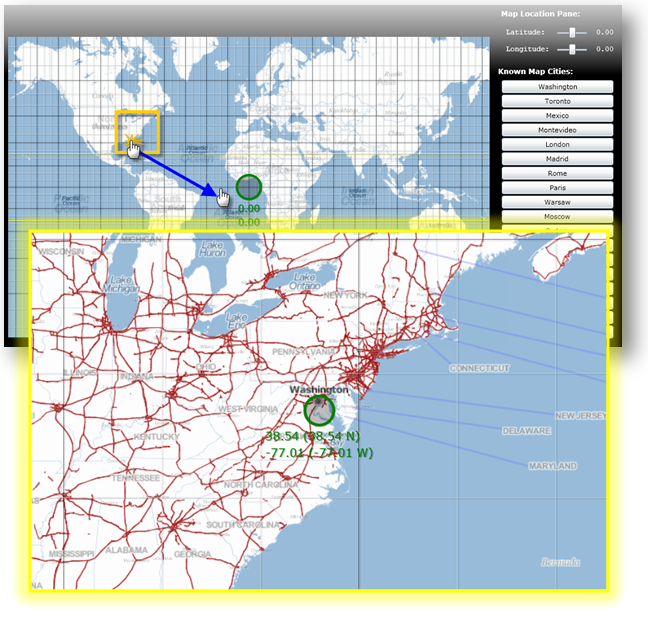


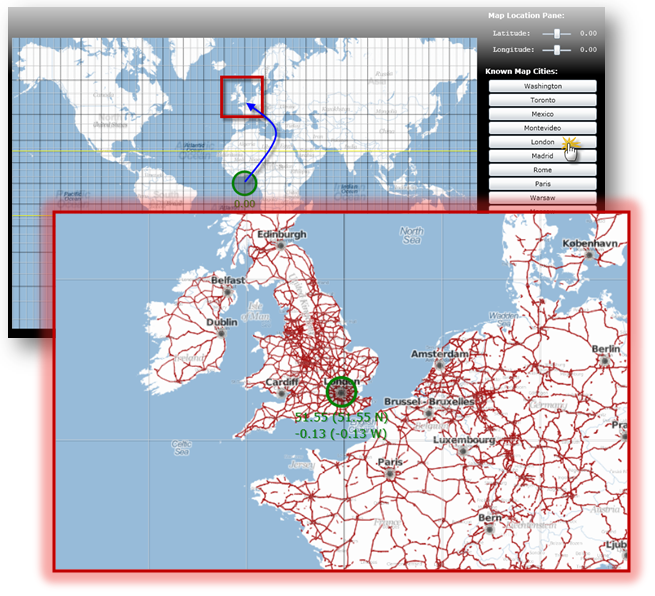
The xamMap™ control’s MapTileSource property is used to configure the source from which geo-imagery is loaded. Please refer to the Supported Geo-Imagery section for a complete list of supported geo-imagery source. However this section will focus only on OpenStreetMap as the geo-imagery source. In addition, the following control will make use of the MapLayer object to display major map coordinates and map the current location.
You will create a user control containing the XamMap control with geo-imagery and map navigation controls. With this control you will be able to navigate the geo-imagery map by using the navigation controls as well as mouse drag interactions.
Navigate using mouse drag-and-drop on the map control:
Navigate using Cities Map Controls:
Create a Microsoft® WPF® project with hosting in a new Web site.
Add the following NuGet package references to your project:
Infragistics.WPF.Controls.Map.XamMap
For more information on setting up the NuGet feed and adding NuGet packages, you can take a look at the following documentation: NuGet Feeds.
Add the following namespace declarations for xamMap in MainPage.xaml.
In XAML:
xmlns:igMap="http://schemas.infragistics.com/xaml"
Add the following tags to the user control’s resource dictionary.
In XAML:
<UserControl.Resources >
    <!--TODO: Add LinearGradientBrush for background -->
    <!--TODO: Add Style for regular font -->
    <!--TODO: Add Style for bold font -->
</UserControl.Resources>
Add a LinearGradientBrush resource for the control’s background.
In XAML:
<LinearGradientBrush x:Key="rscBackgroundBrush" EndPoint="0.5,1" StartPoint="0.5,0">
    <GradientStop Color="Black" Offset="1"/>
    <GradientStop Color="Black" Offset="0.2"/>
    <GradientStop Color="Gray" Offset="0.1"/>
    <GradientStop Color="LightGray" Offset="0"/>
</LinearGradientBrush>
Add two Styles for the navigation controls’ fonts.
In XAML:
<Style x:Name="rscFontStyle" TargetType="TextBlock">
    <Setter Property="FontFamily" Value="Courier New"></Setter>
    <Setter Property="FontSize" Value="12"></Setter>
    <Setter Property="VerticalAlignment" Value="Center"></Setter>
    <Setter Property="Foreground" Value="White"></Setter>
</Style>
<Style x:Name="rscBoldFontStyle" TargetType="TextBlock">
    <Setter Property="FontFamily" Value="Verdana"></Setter>
    <Setter Property="FontSize" Value="12"></Setter>
    <Setter Property="FontWeight" Value="Bold"></Setter>
    <Setter Property="VerticalAlignment" Value="Center"></Setter>
    <Setter Property="Foreground" Value="White"></Setter>
</Style>
Set the Background property of the Grid to the control’s background resource.
In XAML:
<Grid x:Name="LayoutRoot"  Background="{StaticResource rscBackgroundBrush}" >
        <!--TODO: Add a StackPanel with all map controls -->
</Grid>
Add the main StackPanel control with the following properties.
In XAML:
<StackPanel Margin="5" Width="1100" Orientation="Horizontal" >
        <!--TODO: Add a Grid with the geo-imagery map -->
        <!--TODO: Add a StackPanel with map navigation controls -->
</StackPanel>
Add a Grid with the XamMap control.
In XAML:
<Grid >
        <igMap:XamMap Name="xamMap" Width="800" Height="500" Margin="5"
                     Loaded="XamMap_Loaded"
                     WindowRectChanged="XamMap_WindowRectChanged"
                     IsAutoWorldRect="
                     WindowZoomMaximum="40"
                     MapProjectionType="SphericalMercator">
            <!--TODO: Add a MapTileSource with geo-imagery source -->
            <!--TODO: Add a MapLayer for map coordinate lines -->
        </igMap:XamMap>
</Grid>
Add a MapTileSource with OpenStreetMap as the geo-imagery source.
In XAML:
<igMap:XamMap.MapTileSource>
        <igMap:OpenStreetMapTileSource />
</igMap:XamMap.MapTileSource>
Add a MapLayer for map coordinate lines.
In XAML:
<igMap:XamMap.Layers>
    <igMap:MapLayer x:Name="mapLayer" Brushes="Transparent">
    </igMap:MapLayer>
</igMap:XamMap.Layers>
Add a StackPanel with the map navigation controls.
In XAML:
<StackPanel Margin="5" >
      <!--TODO: Add the coordinate navigation controls -->
        <!--TODO: Add the city navigation controls -->
</StackPanel>
Add the following controls for coordinate navigation.
In XAML:
<TextBlock Text=" Map Location Pane:"  Margin="5"
           Style="{StaticResource rscBoldFontStyle}" ></TextBlock>
<StackPanel  Orientation="Vertical" Margin="5">
    <!-- StackPanel with Latitude controls -->
    <StackPanel Orientation="Horizontal" Margin="5" >
        <TextBlock Text=" Latitude:  " VerticalAlignment="Center"
                   Style="{StaticResource rscFontStyle}" >
        </TextBlock>
        <Slider  x:Name="sldLatd" Minimum="-90" Maximum="90"
                 Width="60" Value="0" SmallChange="1" LargeChange="5"
                 ValueChanged="sldLatd_ValueChanged">
        </Slider>
        <TextBlock x:Name="txtLatd" Text="00.00 (00.00 W)" Margin="10,0,0,0"
                   Style="{StaticResource rscFontStyle}" >
        </TextBlock>
    </StackPanel>
    <!-- StackPanel with Longitude controls -->
    <StackPanel Orientation="Horizontal" Margin="5">
        <TextBlock Text=" Longitude: " Style="{StaticResource rscFontStyle}" ></TextBlock>
        <Slider  x:Name="sldLong" Minimum="-180" Maximum="180"
                 Width="60" Value="0" SmallChange="1" LargeChange="5"
                 ValueChanged="sldLong_ValueChanged">
        </Slider>
        <TextBlock x:Name="txtLong" Text="00.00 (00.00 N)" Margin="10,0,0,0"
                   Style="{StaticResource rscFontStyle}" >
        </TextBlock>
    </StackPanel>
</StackPanel>
Add the following controls for city navigation.
In XAML:
<TextBlock Text=" Known Map Cities:" VerticalAlignment="Center"
           Margin="0,10,0,0"
           Style="{StaticResource rscBoldFontStyle}" >
</TextBlock>
<!--Note that cities navigation controls are added dynamicly to this StackPanel-->
<StackPanel x:Name="pnlCities" Margin="5" >
Add the City class to the WPF project
In C#:
// class to store data for a map city
public class City
{
    public string Name = string.Empty;
    public double Latitude = 0.0;
    public double Longitude = 0.0;
    public City()
    {
        Name = string.Empty;
        Latitude = 0.0;
        Longitude = 0.0;
    }
    public City(City newCity)
    {
        Name = newCity.Name;
        Latitude = newCity.Latitude;
        Longitude = newCity.Longitude;
    }
    public City(string newName, double newLatd, double newLong)
    {
        Name = newName;
        Latitude = newLatd;
        Longitude = newLong;
    }
}
In Visual Basic:
' class to store data for a map city
Public Class City
    Public Name As String = String.Empty
    Public Latitude As Double = 0.0
    Public Longitude As Double = 0.0
    Public Sub New()
        Name = String.Empty
        Latitude = 0.0
        Longitude = 0.0
    End Sub
    Public Sub New(ByVal newCity As City)
        Name = newCity.Name
        Latitude = newCity.Latitude
        Longitude = newCity.Longitude
    End Sub
    Public Sub New(ByVal newName As String, ByVal newLatd As Double, ByVal newLong As Double)
        Name = newName
        Latitude = newLatd
        Longitude = newLong
    End Sub
End Class
Add Cities static class with a list of known cities to the WPF project.
In C#:
// class to store cities with known map coordinates as a collection
public static class Cities
{
    static Cities()
    {
        _List = new List<City>() {
            Washington, Toronto, Mexico, Montevideo,
            London, Madrid, Rome,
            Paris, Warsaw, Moscow, Sydney, Johannesburg,
            Tokyo, Beijing, Seoul, HongKong,
            Cairo, Casablanca
         };
    }
    private static List<City> _List;
    public static List<City> List
    {
        get { return _List; }
    }
    // Asia
    public static City Tokyo = new City("Tokyo", 35.67, 139.74);
    public static City Beijing = new City("Beijing", 39.90, 116.38);
    public static City Seoul = new City("Seoul", 37.55, 126.97);
    public static City HongKong = new City("Hong Kong", 22.28, 114.12);
    // Americas
    public static City Washington = new City("Washington", 38.89, -77.03);
    public static City Mexico = new City("Mexico", 19.43, -99.13);
    public static City Toronto = new City("Toronto", 43.64, -79.38);
    public static City Montevideo = new City("Montevideo", -34.88, -56.16);
    // Europe
    public static City Moscow = new City("Moscow", 55.75, 37.61);
    public static City London = new City("London", 51.51, -0.13);
    public static City Madrid = new City("Madrid", 40.42, -3.70);
    public static City Rome = new City("Rome", 41.90, 12.49);
    public static City Paris = new City("Paris", 48.85, 2.34);
    public static City Warsaw = new City("Warsaw", 52.23, 21.0);
    // Australia
    public static City Sydney = new City("Sydney", -33.86, 151.20);
    // Africa
    public static City Johannesburg = new City("Johannesburg", -26.20, 28.04);
    public static City Cairo = new City("Cairo", 30.14, 31.74);
    public static City Casablanca = new City("Casablanca", 33.60, -7.63);
}
In Visual Basic:
' class to store cities with known map coordinates as a collection
Public Module Cities
    Public ReadOnly Property List() As List(Of City)
        Get
            Return New List(Of City)(New City() {Washington, _
                                                 Toronto, Mexico, Montevideo, _
                                                 London, Madrid, Rome, _
                                                 Paris, Warsaw, Moscow, Sydney, _
                                                 Johannesburg, Tokyo, Beijing, _
                                                 Seoul, HongKong, _
                                                 Cairo, Casablanca})
        End Get
    End Property
    ' Asia
    Public Tokyo As New City("Tokyo", 35.67, 139.74)
    Public Beijing As New City("Beijing", 39.9R, 116.38)
    Public Seoul As New City("Seoul", 37.55, 126.97)
    Public HongKong As New City("Hong Kong", 22.28, 114.12)
    ' Americas
    Public Washington As New City("Washington", 38.89, -77.03)
    Public Mexico As New City("Mexico", 19.43, -99.13)
    Public Toronto As New City("Toronto", 43.64, -79.38)
    Public Montevideo As New City("Montevideo", -34.88, -56.16)
    ' Europe
    Public Moscow As New City("Moscow", 55.75, 37.61)
    Public London As New City("London", 51.51, -0.13)
    Public Madrid As New City("Madrid", 40.42, -3.7R)
    Public Rome As New City("Rome", 41.9R, 12.49)
    Public Paris As New City("Paris", 48.85, 2.34)
    Public Warsaw As New City("Warsaw", 52.23, 21.0R)
    ' Australia
    Public Sydney As New City("Sydney", -33.86, 151.2R)
    ' Africa
    Public Johannesburg As New City("Johannesburg", -26.2R, 28.04)
    Public Cairo As New City("Cairo", 30.14, 31.74)
    Public Casablanca As New City("Casablanca", 33.6R, -7.63)
End Module
In the MainPage.xaml.cs file, add the following namespace
In C#:
using Infragistics.Controls.Maps;
using Infragistics;
In Visual Basic:
Imports Infragistics.Controls.Maps
Imports Infragistics
Add the following local variables
In C#:
private double _MapLatitude = 0;
private double _MapLongitude = 0;
In Visual Basic:
Private _MapLatitude As Double = 0
Private _MapLongitude As Double = 0
Handle the xamMap control’s Loaded event.
In C#:
private void xamMap_Loaded(object sender, RoutedEventArgs e)
{
    Point winTopLeft = this.xamMap.MapProjection.ProjectToMap(new Point(-180, 90));
    Point winBottomRight = this.xamMap.MapProjection.ProjectToMap(new Point(180, -90));
    Rect winRect = new Rect();
    winRect.X = Math.Min(winTopLeft.X, winBottomRight.X);
    winRect.Y = Math.Min(winTopLeft.Y, winBottomRight.Y);
    winRect.Width = Math.Abs(winTopLeft.X - winBottomRight.X);
    winRect.Height = Math.Abs(winTopLeft.Y - winBottomRight.Y);
    this.xamMap.WindowRect = this.xamMap.WorldRect = winRect;
    this.xamMap.Layers[0].WorldRect = this.xamMap.WorldRect;
    AddMapCoordinateLines();
    AddMapLocationTracker();
    AddMapCityButtons();
    MoveMapToLocation(0, 0);
}
In Visual Basic:
Private Sub xamMap_Loaded(ByVal sender As Object, ByVal e As RoutedEventArgs)
    Dim winTopLeft As Point = Me.xamMap.MapProjection.ProjectToMap(New Point(-180, 90))
    Dim winBottomRight As Point = Me.xamMap.MapProjection.ProjectToMap(New Point(180, -90))
    Dim winRect As Rect = New Rect()
    winRect.X = Math.Min(winTopLeft.X, winBottomRight.X)
    winRect.Y = Math.Min(winTopLeft.Y, winBottomRight.Y)
    winRect.Width = Math.Abs(winTopLeft.X - winBottomRight.X)
    winRect.Height = Math.Abs(winTopLeft.Y - winBottomRight.Y)
    Me.xamMap.WorldRect = winRect
    Me.xamMap.WindowRect = Me.xamMap.WorldRect
    Me.xamMap.Layers(0).WorldRect = Me.xamMap.WorldRect
    AddMapCoordinateLines()
    AddMapLocationTracker()
    AddMapCityButtons()
    MoveMapToLocation(45, 0)
End Sub
Add a method to add map location tracker
In C#:
private void AddMapLocationTracker()
{
    Point mapLocation = this.xamMap.WindowCenter;
    // Get worldLocation using a projection from Cartesian to Geodetic coordinates
    Point worldLocation = this.xamMap.MapProjection.UnprojectFromMap(mapLocation);
    String elemCaption = Environment.NewLine + Environment.NewLine +
                         Environment.NewLine + Environment.NewLine +
                         String.Format("Long: {0:0.00}", worldLocation.X) +
                         Environment.NewLine +
                         String.Format("Lat:  {0:0.00}", worldLocation.Y);
    Point elemLocation = mapLocation;
    // Create Symbol Element
    SymbolElement mapTracker = new SymbolElement()
    {
        Name = "mapTracker",
        Caption = elemCaption,
        FontSize = 16,
        Foreground = new SolidColorBrush(Colors.Green),
        Stroke = new SolidColorBrush(Colors.Green),
        StrokeThickness = 4,
        SymbolOrigin = elemLocation,
        SymbolType = MapSymbolType.Bubble,
        SymbolSize = 20
    };
    // Add the Symbol Element to the map control
    this.xamMap.Layers[0].Elements.Add(mapTracker);
}
In Visual Basic:
Private Sub AddMapLocationTracker()
    Dim mapLocation As Point = Me.xamMap.WindowCenter
    ' Get worldLocation using a projection from Cartesian to Geodetic coordinates
    Dim worldLocation As Point = Me.xamMap.MapProjection.UnprojectFromMap(mapLocation)
    Dim elemCaption As String = Environment.NewLine + Environment.NewLine + _
                                Environment.NewLine + Environment.NewLine + _
                                String.Format("Long: {0:0.00}", worldLocation.X) + _
                                Environment.NewLine + _
                                String.Format("Lat:  {0:0.00}", worldLocation.Y)
    Dim elemLocation As Point = mapLocation
    ' Create Symbol Element
    Dim mapTracker As New SymbolElement()
    mapTracker.Name = "mapTracker"
    mapTracker.Caption = elemCaption
    mapTracker.FontSize = 16
    mapTracker.Foreground = New SolidColorBrush(Colors.Green)
    mapTracker.Stroke = New SolidColorBrush(Colors.Green)
    mapTracker.StrokeThickness = 4
    mapTracker.SymbolOrigin = elemLocation
    mapTracker.SymbolType = MapSymbolType.Bubble
    mapTracker.SymbolSize = 20
    ' Add the Symbol Element to the map control
    Me.xamMap.Layers(0).Elements.Add(mapTracker)
End Sub
Add a method to add map coordinate lines.
In C#:
 private void AddMapCoordinateLines()
{
    // add map major longitude lines
    for (int i = -180; i < 180; i += 5)
    {
        if (i%15 == 0)
            AddMapLongitudeLine(i, Colors.Black, 0.5);
        else
            AddMapLongitudeLine(i, Colors.LightGray, 0.5);
    }
    // add map major latitude lines
    for (int i = -90; i < 90; i += 5)
    {
        if (i % 15 == 0)
            AddMapLatitudeLine(i, Colors.Black, 0.5);
        else
            AddMapLatitudeLine(i, Colors.LightGray, 0.5);
    }
    // add map Tropic of Cancer line
    AddMapLatitudeLine(23, Colors.Yellow, 1);
    // add map Tropic of Capricorn line
    AddMapLatitudeLine(-23, Colors.Yellow, 1);
}
In Visual Basic:
Private Sub AddMapCoordinateLines()
    ' add map major longitude lines
    For i As Integer = -180 To 179 Step 5
        If i Mod 15 = 0 Then
            AddMapLongitudeLine(i, Colors.Black, 0.5)
        Else
            AddMapLongitudeLine(i, Colors.LightGray, 0.5)
        End If
    Next
    ' add map major latitude lines
    For i As Integer = -90 To 89 Step 5
        If i Mod 15 = 0 Then
            AddMapLatitudeLine(i, Colors.Black, 0.5)
        Else
            AddMapLatitudeLine(i, Colors.LightGray, 0.5)
        End If
    Next
    ' add map Tropic of Cancer line
    AddMapLatitudeLine(23, Colors.Yellow, 1)
    ' add map Tropic of Capricorn line
    AddMapLatitudeLine(-23, Colors.Yellow, 1)
End Sub
Add a method to add longitude line.
In C#:
private void AddMapLongitudeLine(int longitude, Color clr, double stroke)
{
    List<Point> coordPoints = new List<Point>();
    coordPoints.Add(new Point(longitude, -90));
    coordPoints.Add(new Point(longitude, 90));
    // polyline collection for end-points of line
    MapPolylineCollection coordLine = new MapPolylineCollection();
    // Convert Geodetic to Cartesian coordinates
    coordLine.Add(this.xamMap.MapProjection.ProjectToMap(coordPoints));
    // Create path element and set points using polylines
    PathElement lineElement = new PathElement() { Polylines = coordLine };
    lineElement.Fill = new SolidColorBrush(clr);
    lineElement.StrokeThickness = stroke;
    lineElement.ToolTip = "Longitude: " + LongitudeToString(longitude);
    lineElement.Caption = LongitudeToString(longitude);
    // Set world rect for the path element
    Rect worldRect = lineElement.WorldRect;
    worldRect = coordLine.GetWorldRect();
    lineElement.WorldRect = worldRect;
    // Add the path element to the map control
    this.xamMap.Layers[0].Elements.Add(lineElement);
}
In Visual Basic:
Private Sub AddMapLongitudeLine(ByVal longitude As Integer, ByVal clr As Color, ByVal stroke As Double)
    Dim coordPoints As New List(Of Point)()
    coordPoints.Add(New Point(longitude, -90))
    coordPoints.Add(New Point(longitude, 90))
    ' polyline collection for end-points of line
    Dim coordLine As New MapPolylineCollection()
    ' Convert Geodetic to Cartesian coordinates
    coordLine.Add(Me.xamMap.MapProjection.ProjectToMap(coordPoints))
    ' Create path element and set points using polylines
    Dim lineElement As New PathElement()
    lineElement.Fill = New SolidColorBrush(clr)
    lineElement.StrokeThickness = stroke
    lineElement.ToolTip = "Longitude: " & LongitudeToString(longitude)
    lineElement.Caption = LongitudeToString(longitude)
    ' Set world rect for the path element
    Dim worldRect As Rect = lineElement.WorldRect
    worldRect = coordLine.GetWorldRect()
    lineElement.WorldRect = worldRect
    ' Add the path element to the map control
    Me.xamMap.Layers(0).Elements.Add(lineElement)
End Sub
Add a method to add latitude line.
In C#:
private void AddMapLatitudeLine(int latitude, Color clr, double stroke)
{
    List<Point> coordPoints = new List<Point>();
    coordPoints.Add(new Point(-180, latitude));
    coordPoints.Add(new Point(180, latitude));
    // polyline collection for end-points of line
    MapPolylineCollection coordLine = new MapPolylineCollection();
    // Convert Geodetic to Cartesian coordinates
    coordLine.Add(this.xamMap.MapProjection.ProjectToMap(coordPoints));
    // Create path element and set points using polylines
    PathElement lineElement = new PathElement() { Polylines = coordLine };
    lineElement.Fill = new SolidColorBrush(clr);
    lineElement.StrokeThickness = stroke;
    lineElement.ToolTip = "Latitude: " + LatitudeToString(latitude);
    lineElement.Caption = LatitudeToString(latitude);
    // Set world rect for the path element
    Rect worldRect = lineElement.WorldRect;
    worldRect = coordLine.GetWorldRect();
    lineElement.WorldRect = worldRect;
    // Add the path element to the map control
    this.xamMap.Layers[0].Elements.Add(lineElement);
}
In Visual Basic:
Private Sub AddMapLatitudeLine(ByVal latitude As Integer, ByVal clr As Color, ByVal stroke As Double)
    Dim coordPoints As New List(Of Point)()
    coordPoints.Add(New Point(-180, latitude))
    coordPoints.Add(New Point(180, latitude))
    ' polyline collection for end-points of line
    Dim coordLine As New MapPolylineCollection()
    ' Convert Geodetic to Cartesian coordinates
    coordLine.Add(Me.xamMap.MapProjection.ProjectToMap(coordPoints))
    ' Create path element and set points using polylines
    Dim lineElement As New PathElement()
    lineElement.Fill = New SolidColorBrush(clr)
    lineElement.StrokeThickness = stroke
    lineElement.ToolTip = "Latitude: " & LatitudeToString(latitude)
    lineElement.Caption = LatitudeToString(latitude)
    ' Set world rect for the path element
    Dim worldRect As Rect = lineElement.WorldRect
    worldRect = coordLine.GetWorldRect()
    lineElement.WorldRect = worldRect
    ' Add the path element to the map control
    Me.xamMap.Layers(0).Elements.Add(lineElement)
End Sub
Add a method to add map city navigation buttons.
In C#:
private void AddMapCityButtons()
{
    // add buttons for all known cites
    for (int i = 0; i < Cities.List.Count; i++)
    {
        Button btn = new Button();
        btn.Content = Cities.List[i].Name;
        btn.Margin = new System.Windows.Thickness(5, 2, 5, 0);
        btn.Click += new RoutedEventHandler(btnCity_Click);
        this.pnlCities.Children.Add(btn);
    }
}
In Visual Basic:
Private Sub AddMapCityButtons()
    ' add buttons for all known cites
    For i As Integer = 0 To Cities.List.Count - 1
        Dim btn As New Button()
        btn.Content = Cities.List(i).Name
        btn.Margin = New System.Windows.Thickness(5, 2, 5, 0)
        AddHandler btn.Click, AddressOf btnCity_Click
        Me.pnlCities.Children.Add(btn)
    Next
End Sub
Implement the Click event for all map city navigation buttons.
In C#:
private void btnCity_Click(object sender, RoutedEventArgs e)
{
    Button btn = (Button)sender;
    // find the city name and zoom to it on the map
    for (int i = 0; i < Cities.List.Count; i++)
    {
        if (btn.Content.Equals(Cities.List[i].Name))
        {
            ZoomMapToCity(Cities.List[i]);
            break;
        }
    }
}
In Visual Basic:
Private Sub btnCity_Click(ByVal sender As Object, ByVal e As RoutedEventArgs)
    Dim btn As Button = DirectCast(sender, Button)
    ' find the city name and zoom to it on the map
    For i As Integer = 0 To Cities.List.Count - 1
        If btn.Content.Equals(Cities.List(i).Name) Then
            ZoomMapToCity(Cities.List(i))
            Exit For
        End If
    Next
End Sub
Add a method to zoom in the map to a city.
In C#:
private void ZoomMapToCity(City mapCity)
{
    // Create coordinates for zoom box
    Point worldTopLeft = new Point(mapCity.Longitude - 2,
                                   mapCity.Latitude + 2);
    Point worldBottomRight = new Point(mapCity.Longitude + 2,
                                       mapCity.Latitude - 2);
    // Convert Geodetic to Cartesian coordinates
    Point winTopLeft = this.xamMap.MapProjection.ProjectToMap(worldTopLeft);
    Point winBottomRight = this.xamMap.MapProjection.ProjectToMap(worldBottomRight);
    Rect winRect = new Rect();
    winRect.X = Math.Min(winTopLeft.X, winBottomRight.X);
    winRect.Y = Math.Min(winTopLeft.Y, winBottomRight.Y);
    winRect.Width = Math.Abs(winTopLeft.X - winBottomRight.X);
    winRect.Height = Math.Abs(winTopLeft.Y - winBottomRight.Y);
    this.xamMap.WindowRect = winRect;
}
In Visual Basic:
Private Sub ZoomMapToCity(ByVal mapCity As City)
    ' Create coordinates for zoom box
    Dim worldTopLeft As New Point(mapCity.Longitude - 2, mapCity.Latitude + 2)
    Dim worldBottomRight As New Point(mapCity.Longitude + 2, mapCity.Latitude - 2)
    ' Convert Geodetic to Cartesian coordinates
    Dim winTopLeft As Point = Me.xamMap.MapProjection.ProjectToMap(worldTopLeft)
    Dim winBottomRight As Point = Me.xamMap.MapProjection.ProjectToMap(worldBottomRight)
    Dim winRect As New Rect()
    winRect.X = Math.Min(winTopLeft.X, winBottomRight.X)
    winRect.Y = Math.Min(winTopLeft.Y, winBottomRight.Y)
    winRect.Width = Math.Abs(winTopLeft.X - winBottomRight.X)
    winRect.Height = Math.Abs(winTopLeft.Y - winBottomRight.Y)
    Me.xamMap.WindowRect = winRect
End Sub
Add a method to move map to a geodetic location.
In C#:
private void MoveMapToLocation(double longitude, double latitude)
{
    Point worldLocation = new Point(longitude, latitude);
    // Convert Geodetic to Cartesian coordinates
    Point winCenter = this.xamMap.MapProjection.ProjectToMap(worldLocation);
    this.xamMap.WindowCenter = winCenter;
}
In Visual Basic:
Private Sub MoveMapToLocation(ByVal longitude As Double, ByVal latitude As Double)
    Dim worldLocation As New Point(longitude, latitude)
    ' Convert Geodetic to Cartesian coordinates
    Dim winCenter As Point = Me.xamMap.MapProjection.ProjectToMap(worldLocation)
    Me.xamMap.WindowCenter = winCenter
End Sub
Handle the xamMap control’s WindowRectChanged event
In C#:
private void xamMap_WindowRectChanged(object sender, MapWindowRectChangedEventArgs e)
{
    Point mapLocation = this.xamMap.WindowCenter;
    // Convert Cartesian to Geodetic coordinates
    Point worldLocation = this.xamMap.MapProjection.UnprojectFromMap(mapLocation);
    _MapLongitude = worldLocation.X;
    _MapLatitude = worldLocation.Y;
    UpdateMapLocationPane();
    UpdateMapLocationTracker();
}
In Visual Basic:
Private Sub xamMap_WindowRectChanged(ByVal sender As Object, ByVal e As MapWindowRectChangedEventArgs)
    Dim mapLocation As Point = Me.xamMap.WindowCenter
    ' Convert Cartesian to Geodetic coordinates
    Dim worldLocation As Point = Me.xamMap.MapProjection.UnprojectFromMap(mapLocation)
    _MapLongitude = worldLocation.X
    _MapLatitude = worldLocation.Y
    UpdateMapLocationPane()
    UpdateMapLocationTracker()
End Sub
Add a method to update the map location pane
In C#:
private void UpdateMapLocationPane()
{
    // format coordinate for the map location pane
    this.txtLong.Text = LongitudeToString(_MapLongitude);
    this.txtLatd.Text = LatitudeToString(_MapLatitude);
}
In Visual Basic:
Private Sub UpdateMapLocationPane()
    ' format coordinate for the map location pane
    Me.txtLong.Text = LongitudeToString(_MapLongitude)
    Me.txtLatd.Text = LatitudeToString(_MapLatitude)
End Sub
Add the following two methods for formatting the coordinates to string.
In C#:
private string LongitudeToString(double longitude)
{
    string str = String.Format("{0:0.00}", longitude);
    if (longitude < 0)
        str += String.Format(" ({0:0.00} W)", longitude);
    if (longitude > 0)
        str += String.Format(" ({0:0.00} E)", longitude);
    return str;
}
private string LatitudeToString(double latitude)
{
    string str = String.Format("{0:0.00}", latitude);
    if (latitude < 0)
        str += String.Format(" ({0:0.00} S)", latitude);
    if (latitude > 0)
        str += String.Format(" ({0:0.00} N)", latitude);
    return str;
}
In Visual Basic:
Private Function LongitudeToString(ByVal longitude As Double) As String
    Dim str As String = String.Format("{0:0.00}", longitude)
    If longitude < 0 Then str += String.Format(" ({0:0.00} W)", longitude)
    If longitude > 0 Then str += String.Format(" ({0:0.00} E)", longitude)
    Return str
End Function
Private Function LatitudeToString(ByVal latitude As Double) As String
    Dim str As String = String.Format("{0:0.00}", latitude)
    If latitude < 0 Then str += String.Format(" ({0:0.00} S)", latitude)
    If latitude > 0 Then str += String.Format(" ({0:0.00} N)", latitude)
    Return str
End Function
Add a method to update the map location tracker.
In C#:
private void UpdateMapLocationTracker()
{
    // format coordinates for the map tracker
    String trackerCaption = Environment.NewLine + Environment.NewLine +
                            Environment.NewLine + Environment.NewLine +
                            LatitudeToString(_MapLatitude) +
                            Environment.NewLine +
                            LongitudeToString(_MapLongitude);
    Point trackerLocation = this.xamMap.WindowCenter;
    // find and update the map tracker (symbol element)
    for (int i = 0; i < this.xamMap.Layers[0].Elements.Count; i++)
    {
        if (this.xamMap.Layers[0].Elements[i].Name != null)
        {
            if (this.xamMap.Layers[0].Elements[i].Name.Equals("mapTracker"))
            {
                this.xamMap.Layers[0].Elements[i].SymbolOrigin = trackerLocation;
                this.xamMap.Layers[0].Elements[i].Caption = trackerCaption;
                break;
            }
        }
    }
}
In Visual Basic:
Private Sub UpdateMapLocationTracker()
    ' format coordinates for the map tracker
    Dim trackerCaption As String = Environment.NewLine + Environment.NewLine + _
                                    Environment.NewLine + Environment.NewLine + _
                                    LatitudeToString(_MapLatitude) + _
                                    Environment.NewLine + _
                                    LongitudeToString(_MapLongitude)
    Dim trackerLocation As Point = Me.xamMap.WindowCenter
    ' find and update the map tracker (symbol element)
    For i As Integer = 0 To Me.xamMap.Layers(0).Elements.Count - 1
        If Me.xamMap.Layers(0).Elements(i).Name IsNot Nothing Then
            If Me.xamMap.Layers(0).Elements(i).Name.Equals("mapTracker") Then
                Me.xamMap.Layers(0).Elements(i).SymbolOrigin = trackerLocation
                Me.xamMap.Layers(0).Elements(i).Caption = trackerCaption
                Exit For
            End If
        End If
    Next
End Sub
Handle the latitude Slider’s ValueChanged events.
In C#:
private void sldLatd_ValueChanged(object sender, RoutedPropertyChangedEventArgs<double> e)
{
    _MapLatitude = e.NewValue;
    this.txtLatd.Text = String.Format("Lat:  {0:0.00}", e.NewValue);
    MoveMapToLocation(_MapLongitude, _MapLatitude);
}
In Visual Basic:
Private Sub sldLong_ValueChanged(ByVal sender As Object, ByVal e As RoutedPropertyChangedEventArgs(Of Double))
    _MapLongitude = e.NewValue
    Me.txtLong.Text = String.Format("Long: {0:0.00}", e.NewValue)
    MoveMapToLocation(_MapLongitude, _MapLatitude)
End Sub
Handle the longitude Slider’s ValueChanged events.
In C#:
private void sldLong_ValueChanged(object sender, RoutedPropertyChangedEventArgs<double> e)
{
    _MapLongitude = e.NewValue;
    this.txtLong.Text = String.Format("Long: {0:0.00}", e.NewValue);
    MoveMapToLocation(_MapLongitude, _MapLatitude);
}
In Visual Basic:
Private Sub sldLong_ValueChanged(ByVal sender As Object, ByVal e As RoutedPropertyChangedEventArgs(Of Double))
    _MapLongitude = e.NewValue
    Me.txtLong.Text = String.Format("Long: {0:0.00}", e.NewValue)
    MoveMapToLocation(_MapLongitude, _MapLatitude)
End Sub
Run the application. The xamMap control will display the geo-imagery map with major map coordinates and map navigation controls.